
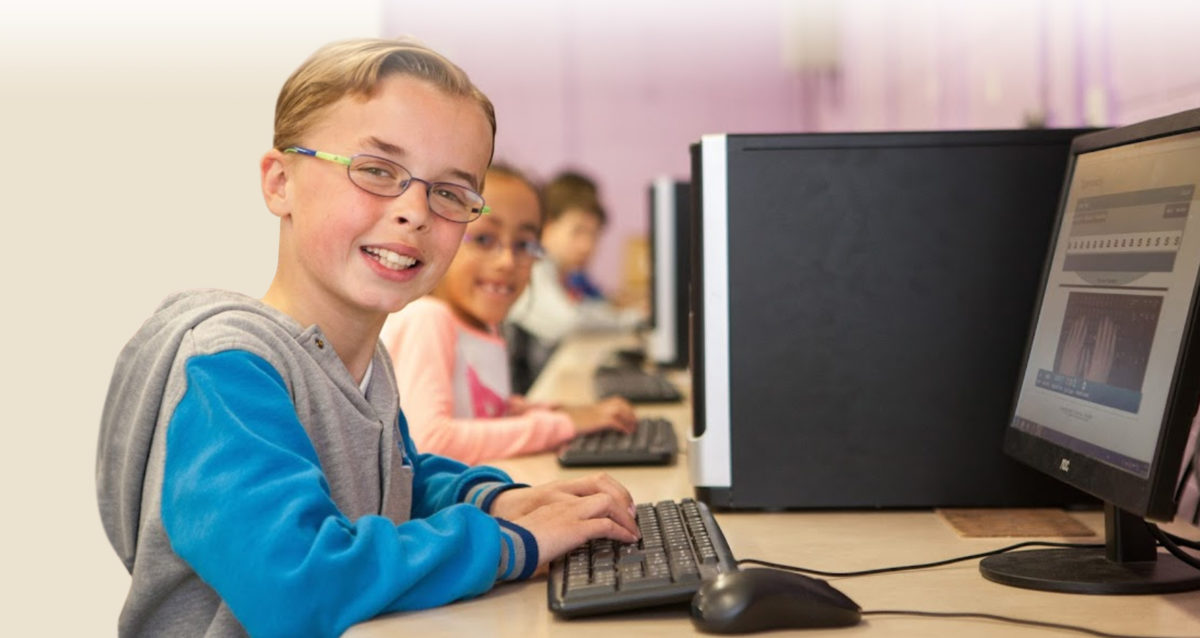

New after school typing course in Lucan Dublin

Searsol is pleased to announce the opening of our new after school typing course centre in Lucan, Co Dublin. The course will take place in St Kevin’s Community School Lucan, Co Dublin, opposite Liffey Valley. The course centre will start on Monday 22nd of January 2018 at 4.15 pm.

Searsol is currently offering a free introductory first session trial of Searsol’s after school typing courses for any child who is eight years old or older that may be interested in trying out our typing course.

Our typing course is specifically designed to develop typing skills for children. Searsol has provided after school typing courses over the last eight years in Ireland and have a high success rate of students that have successfully learnt how to touch type. During the course, the student will learn how to type correctly assisted by a qualified tutor.

This course would suit children that have learning differences like Dyslexia or Dyspraxia but also suitable for any child that wants to learn how to touch type and have gained an exemption to use a laptop for exams. To book your free trial place you can contact Searsol on 01-6303384 or book a free trial at Lucan centre: https://searsol.com/location/lucan-dublin/


New after school typing course centre in Mounttown Community Facilities, Lower Mounttown Road,Dun-Laoghaire, Co Dublin starting on Thursday 12th January 2017

Searsol is pleased to announce the opening of our new after-school typing course center in Mounttown Community Facilities, Lower Mounttown Road, Dun-Laoghaire, Co Dublin which is starting on Thursday 12th  of January 2017. There will be two classes, with the class starting time at 3.15 pm and the other at 4.15 pm.

Jackie Andrews is currently offering a free introductory first session trial of Searsol’s after-school typing courses for any child who is eight years old or older that may be interested in trying out our typing course. Our typing course is specifically designed to develop typing skills for children. Searsol has provided after-school typing courses over the last eight years in Ireland and has a high success rate of students that have successfully learned how to touch type.

During the course, the student will learn how to type correctly assisted by a qualified tutor. This course would suit children that have learning differences like Dyslexia or Dyspraxia but also suitable for any child that wants to learn how to touch type and have gained an exemption to use a laptop for exams.

The after-school typing course is starting at Mounttown Community Facilities, Lower Mounttown Road, Dun-Laoghaire on Thursday 12th of January 2017 at 3.15 or 4.15 pm. The course lasts one hour per week and the course schedule follows the school term.

To book your free trial place  click on the following link: https://searsol.com/location/monkstown-co-dublin/


New after school typing course in Morning Start NS, Ballyphehane, Cork City starting on Tuesday 6th and Thursday 8th December 2016

Searsol is pleased to announce the opening of our new typing course centre in Morning Star National School, Ballyphehane, Cork which is starting on Tuesday 6th  and Thursday 8th of December 2016. There will be four classes, with class starting time at 3.45 pm and the other at 5 pm. The course centre will be operated by Donal Deasy and he can be contacted on 086-3891767.

Donal Deasy is currently offering a free introductory first session trial of Searsol’s after school typing courses for any child who is eight years old or older that may be interested in trying out our typing course. Our typing course is specifically designed to develop typing skills for children. Searsol has provided after school typing courses over the last eight years in Ireland and have a high success rate of students that have successfully learnt how to touch type.

During the course, the student will learn how to type correctly assisted by a qualified tutor. This course would suit children that have learning differences like Dyslexia or Dyspraxia but also suitable for any child that wants to learn how to touch type and have gained an exemption to use a laptop for exams.

The after school typing course is starting at Morning Star NS, Ballyphehane, Cork on Tuesday 6th  and Thursday 8th of December 2016 at 3.45 or 5 pm. The course lasts one hour per week and the course schedule follows the school term.

To book your free trial place you can contact Donal Deasy on 086-3891767 or visit our web page at  http://searsol.com


Your child got a laptop exemption what should you do next?


So you have finally got approval for a laptop for your child from the Department of Education.

What should you do next to prepare your child in readiness for their new laptop arrival?

First off congrats on being pre-approved for the laptop, well done! So what should you do next to help your child before the arrival of their new laptop? Searsol recommends that your child start a touch typing course before your child starts using their new laptop. Why should we do this you may ask?

Well, the benefits of doing a touch typing course are as follows:

Your child doesn’t pick any bad habit formation using the keyboard themselves. If they already starting to type using a keyboard themselves, it takes around three times the amount of time to learn the correct technique. By doing a touch typing course you are giving your child a skill for life. They will learn the correct typing technique and become fast typers without having to look down at the keyboard!


We recommend learning how to touch type in a classroom environment. This is because your child is of similar age children and the learning process works extremely well.

Properly supervised by a trained tutor will ensure that your child learns how to touch type using the correct technique. By doing a touch typing course, your child is working away at their own pace and feels a sense of achievement doing such a course.

On our course we have three typing standards that your child can achieve:

  • Bronze – 15 words per minute
  • Silver – 25 words per minute
  • Gold – 4o words per minute

The Dept. of Education recommend that your child has a typing speed of 25 words per minute if they are going to use a laptop for typing out their exams.

Using a recommended typing course such as Searsol’s. You are ensuring that your child is learning in a positive learning environment and will be not be easily distracted.


In our course centres, Searsol uses keyboard covers to ensure that a child doesn’t look down at the keyboard.


Searsol touch typing courses ensure a high level of training so that your child learns in a positive environment. If you want to try our one of courses, you can contact Searsol on 01-6303384, or alternatively, you can book a free trial assessment by clicking on https://searsol.com/find-centers


New Summer Computer Camp in Limerick City – Limerick Institute of Technology

newbook-now-button-1New Summer Skills Computer Limerick City July 2016 – Limerick Institute of Technology.

Searsol are pleased to announce that we now offering our new skills based computer camps in limerick City. The course takes place at the Limerick Institute of Technology and is aimed for children who want to improve their computer skills.

The emphasis is teaching your child the fundamental skill of touch typing along with other appropriate computer skills that will help them with school work. The course objective is to enhance a child skills so they can type out their own school projects in efficient and effectively manner.

Our Computer course offers the following:

  • Touch Typing – the first hour of the course is dedicated to learning how to touch type.
  • Email fundamentals – setting up and using email correctly. Compose, reply, and forward messages and adding attachments.
  • Word Processing – create, change font’s size and colour, add page borders, headers, footers etc.
  • Uploading, editing and cropping pictures on the PC.
  • Creating their own online comic book.
  • Creating their own avatar and character
  • Creating their own birthday cards.
  • Creating their own Picture collages.
  • Cloud storage – storing documents on the internet.
  • 3D Animation code image design (new for 2016)
  • And much more…

We are taking bookings for Summer computer camp which runs on a daily basis for three hours per day. Places are limited so early booking is advised!

book-now-button-1


What computer skills should your child learn over the Summer months of 2016?

Computer skills

With the increasing array of computer options available to children – PC, laptop, tablet and smartphones. Children are been exposed to the wonders of technology at an increasing rate and at an earlier age. What computer skills should a child be learning over the summer months of 2016 to stay ahead of the learning curve?

Touch Typing

To be able to touch type with speeds of up to 40 word per minute can give you child a brilliant life skill no matter what device they will use in the future. Touch typing is one of these skills that may not be considered vital to a student. But as they work with computers for the rest of their lives, to be able to touch type correctly and with speed can save them time.

Email

Email is still the biggest channel of communication for everyone, even greater than social media. Students should be learning the basics of email such as how to create, reply, forward, and attachments. Email is still vital for students to learn and operate in today’s modern society because businesses still engage most of their communication via email.

Coding

All children should be introduced to the concept of coding.  The logic that they learn from coding can be applied in various situations of life such as mathematics, computers, economics, and finance. By learning how to code, a child improves the skill range and helps them improve their job prospects in later life.

Cloud Computing

We are only beginning to understand the capabilities of cloud computing. Cloud computing is defined as deploying groups of remote servers and software networks that allow centralized data storage and online access to computer services or resources.

In essence, we no longer need to stored out computer files (documents, music, pictures etc) on local devices hard drive but can be accessed from centralised storage area, the “cloud”. We can use multiple devices to access the documents and can update these where ever we have an internet connection and device. This is a major change we have worked with computers and it will lead to great efficiency for everyone.


Web-based application v’s computer applications

Traditionally students used a Pc or laptop as their main computing device. They installed applications and used them to update their work. But with the development of the internet and cloud computing. The move is now to use the internet as the go-to option to update documents or use applications. Where traditionally students would have used Microsoft Office for created documents, spreadsheets etc. Now the move is to use online resources instead such as Google Drive or Microsoft Office 365. Students are now arranging their lives online so the skills they need to learn is using web-based application as opposed to computer applications.


These are computer skills that will help your child to stay ahead of the learning curve with computers. If you are interested in helping to develop your child’s skills, why not book them into one of the computer camps over Summer 2016. More details of Searsol’s Computer camps are available by clicking on the following link.


New after school typing course in St Tiernan’s Community School Dundrum Dublin

Searsol is pleased to announce the opening of our new typing course centre in St Tiernan’s Community School, Dublin 16 on Wednesday 6th of April.


Searsol is currently offering a free introductory first session trial of their typing course for any child who is eight years old or older that may be interested in trying out our typing course. Our typing course is specifically designed to develop typing skills for children. Searsol has provided after school typing course over the last eight years in the Dublin area and has a high success rate of students that have successfully learnt how to touch type.


During the course, the student will learn how to type correctly assisted by a qualified tutor. This course would suit children that have learning differences like Dyslexia or Dyspraxia but also suitable for any child that wants to learn how to touch type.

The after-school typing course is starting at St Tiernan’s Community School, Parkvale, Balally, Dublin 16 on Wednesday 6th of April at 5 pm. The course lasts one hour per week and the course schedule follows the school term.

To book your place you can contact Searsol on 016303384 or visit or webpage https://searsol.com/location/dundrum-dublin/


How to speed up your typing skills?

So you want to improve your typing speed? How do you do this and what successful ways can you implement to improve your typing speed?


Searsol recommends that you do at least an hour of typing practice a week. We provide typing courses where students can learn how to type in a controlled environment where the skill of typing is encouraged. We also provide online courses for those students that access our course centres.


In order to improve your typing speed, you must go beyond the minimum recommendation of one hour per week. We suggest a triangulation approach to learning how to type. First we recommend that you do the one hour practice at our course centre or online. Then combine this with any typing that you need to do at home or at school. Please note that at all times your fingers need to be on the home keys. This will ensure correct finger position at all times. By doing this will improve your typing speed and reinforce the learning you already have.


If you are unable to make our typing centre, we recommend trying out online typing course  at www.typewiz.com

What should a child be learning over the Summer of 2015?

Computer skills

With the increasing array of computers options available to children – PC, laptop, tablet and smartphones. Children are been exposed to the wonders of technology at increasing rate and at earlier age. But computer skills should a child be learning in 2015 to stay ahead of the learning curve?


Cloud Computing

We are only beginning to understand the capabilities of cloud computing. Cloud computing is defined as deploying groups of remote servers and software networks that allow centralized data storage and online access to computer services or resources. (Wikipedia). But what does that mean to us a computer users? Well in essence we no longer need to stored out computer files (documents, music, pictures etc) on local devices hard drive but can be accessed from centralised storage area, the “cloud”. We can use multiple devices to access the documents and can update these where ever we have internet connection and device. This is a major change we have worked with computers and it will lead to great efficiency for everyone.


Web based application v’s computer applications

Traditionally students used a Pc or laptop as their main computing device. They installed applications and used them to update their work. But with the development of the internet and cloud computing. The move is now to use the internet as the go to option to update documents or use applications. Where traditionally students would have used Microsoft Office for created documents, spreadsheets etc. Now the move is to use online resources instead such as Google Drive or Microsoft Office 365. Students are now arranging their lives online so the skills the need to learn is using web based application as opposed to computer applications.


Email

Email is still the biggest channel of communication for everyone, even greater than social media. Students should be learning the basics of email such as how to create, reply, forward and attachments. Email is still vital for students to learn and operate in today’s modern society because business still engage most of their communication via email.


Touch Typing

To be able to touch type with speeds of upto 40 word per minute can give you child a brilliant life skill no matter what device they will use in the future. Touch typing is one of these skills that may not be considered vital to a student. But as they work with computers for the rest of their lives, to be able to touch type correctly and with speed can save them time.


These are some computer skills that will help you child to stay ahead of the learning curve with computers. If you are interested in helping to develop your child skills, why not book them into one of computers camps over the Summer 2015. More details of Searsol’s Computer camps are available by clicking on the following link.

What essential computer skills should your child learn to stay ahead of the curve?

Computer skills

What essential computer skills should your child learn to stay ahead of the curve?


With the increasing array of computer options available to children – PC, laptop, tablet, and smartphones. Children are been exposed to the wonders of technology at an increasing rate and at an earlier age. But computer skills should a child be learning to stay ahead of the learning curve?


Cloud Computing

We are only beginning to understand the capabilities of cloud computing. Cloud computing is defined as deploying groups of remote servers and software networks that allow centralized data storage and online access to computer services or resources. (Wikipedia). But what does that mean to us, computer users? Well, in essence, we no longer need to store our computer files (documents, music, pictures, etc) on local devices hard drive but can be accessed from centralised storage area, the “cloud”. We can use multiple devices to access the documents and can update these where ever we have an internet connection and device. This is a major change we have worked with computers and it will lead to great efficiency for everyone.


Web-based application v’s computer applications

Traditionally students used a Pc or laptop as their main computing device. They installed applications and used them to update their work. But with the development of the internet and cloud computing. The move is now to use the internet as the go-to option to update documents or use applications. Where traditionally students would have used Microsoft Office for created documents, spreadsheets etc. Now the move is to use online resources instead such as Google Drive or Microsoft Office 365. Students are now arranging their lives online so the skills they need to learn is using web-based application as opposed to computer applications.


Email

Email is still the biggest channel of communication for everyone, even greater than social media. Students should be learning the basics of email such as how to create, reply, forward, and attachments. Email is still vital for students to learn and operate in today’s modern society because businesses still engages most of their communication via email.


Touch Typing

To be able to touch type with speeds of up to 40 word per minute can give you child a brilliant life skill no matter what device they will use in the future. Touch typing is one of these skills that may not be considered vital to a student. But as they work with computers for the rest of their lives, to be able to touch type correctly and with speed can save them time.


These are some computer skills that will help your child to stay ahead of the learning curve with computers. If you are interested in helping to develop your child’s skills, why not book them into one of the computer camps over Easter or Summer. More details of Searsol’s Computer camps are available by clicking on the following link.

What is the best online spelling and grammar software available on the market today?

In any word applications such as Microsoft Word, Google docs or Open office there is spelling and grammar checking built into the program. So why would you need to supplement this with a purchase of another product that does the check for you?


The reason why you would use a separate program to check for errors on your document is that the program you is better than the one


Features that online spelling and grammar software that offer :

  • The software can corrects entire sentences automatically as opposed to slower method of each word being checked.
  • Corrects spelling mistakes with a higher degree of accuracy compared to traditional spell checkers
  • Misused words and be added to dictionary so that the program can remember these.
  • Grammar errors are checked against a sentence to ensure that it is correct.
  • The correction is based on context and so the words provided are extremely reliable.
  • Users can work quickly and efficiently ensuring that work produced is highly accurate.


The program that we have used over the last several years has been the online spelling and grammar software called Ginger. Ginger software is an award-winning productivity-focused company that helps you write faster and better, thanks to grammar checker,punctuation, and spell checker tools which automatically detect and correct misused words and grammar mistakes. Ginger works with whichever device or platform you prefer to use. Just install the productivity app on your phone or tablet, or install Ginger on your desktop to improve your communication skills automatically.


Write unique text and enrich existing sentences with the help of Ginger’s sentence rephraser, and utilize the synonyms tool to replace boring words with script that’s much more exciting.

Avoid embarrassing typos with the spelling book, and use all the features found on Ginger Page to improve your writing skills. Write fast without fear! Whether on your computer or using the keyboard app on your phone, Ginger will correct your mistakes for you.


Any time you’re writing for business, sending an important email, or completing school assignments, you can use Ginger’s writing tools to improve your vocabulary and prevent errors. Whether using the mobile keyboard typing app or your computer’s keyboard, Ginger is the best writing solution and productivity tool available.


Use our grammar rules to ensure that your writing is as accurate as it can be. Once you’re finished, use our proofreader to check for mistakes with a single click or tap.

Improve your communication skills with our dictionary, translations, and text reader, no matter what you’re writing. Ginger Software products are suitable for both native English speakers and speakers of English as a Second Language (ESL). Write with confidence, enhance your language skills, and never worry about mistakes again.


Ginger is the only software able to correct whole sentences in a single click. It goes beyond other spell checkers, analysing the context of sentences to automatically correct unusual spelling mistakes, misused words and grammar errors. Ginger Software is not only a text correction tool, but a powerful learning platform. Ginger provides valuable writing support to its users and statistical guidance through its reporting features for educators and parents.


To purchase a licence of GInger software, click on the following link http://searsol.com/typing-centres/